HR tools feel Overwhelming
Talentflake
Designing a calm, scalable HRMS
Project Snapshot
Talentflake A role-aware, mobile-first HR platform built to reduce cognitive load.

Role
Product Designer

Platform
Web + Mobile

Focus
HRMS / Workforce Management
The Problem
Poor onboarding visibility
Reporting feels intimidating
Lack of trust
"As teams scale, HR systems become heavier — increasing errors, anxiety, and inefficiency."
Design Goals

Reduce complexity
Call out a feature, benefit, or value that can stand on its own.

Design for role clarity
Tailored experiences that respect how different users think and work.

Enable trust through visibility
Make processes transparent with clear status indicators and audit trails.

Make daily workflows predictable
Call out a feature, benefit, or value that can stand on its own.

Build a scalable foundation
Design systems that grow gracefully without adding complexity.
The Stakeholders
Employee
Call out a feature, benefit, or value that can stand on its own.
Call out a feature, benefit, or value that can stand on its own.
Call out a feature, benefit, or value that can stand on its own.
Call out a feature, benefit, or value that can stand on its own.
Manager
Call out a feature, benefit, or value that can stand on its own.
Call out a feature, benefit, or value that can stand on its own.
Call out a feature, benefit, or value that can stand on its own.
Call out a feature, benefit, or value that can stand on its own.
HR Admin
Call out a feature, benefit, or value that can stand on its own.
Call out a feature, benefit, or value that can stand on its own.
Call out a feature, benefit, or value that can stand on its own.
Call out a feature, benefit, or value that can stand on its own.
Contractor
Call out a feature, benefit, or value that can stand on its own.
Call out a feature, benefit, or value that can stand on its own.
Call out a feature, benefit, or value that can stand on its own.
Call out a feature, benefit, or value that can stand on its own.
Finance
Call out a feature, benefit, or value that can stand on its own.
Call out a feature, benefit, or value that can stand on its own.
Call out a feature, benefit, or value that can stand on its own.
Call out a feature, benefit, or value that can stand on its own.
System Admin
Call out a feature, benefit, or value that can stand on its own.
Call out a feature, benefit, or value that can stand on its own.
Call out a feature, benefit, or value that can stand on its own.
Call out a feature, benefit, or value that can stand on its own.
Pain Points Across the Organization
Employee
Says
- I don't want to mess this up
- Where do I find that?
Does
- Double-checks forms
- Asks colleagues for help
Thinks
- Hope I filled this correctly
- This seems complicated
Feels
- Anxious about errors
- Uncertain about processes
Manager
Says
- I need to see my team's status
- Too many approval emails
Does
- Checks multiple tabs
- Batch processes approvals
Thinks
- I hope nothing slips through
- Need better overview
Feels
- Overwhelmed by notifications
- Responsible for accuracy
HR Admin
Says
• We need to stay compliant
• Reporting takes forever
Does
• Manual data exports
• Cross-references spreadsheets
Thinks
• Hope the data is accurate
• This should be automated
Feels
• Stressed by compliance
• Frustrated by inefficiency
Contractor
Says
• When will I get paid?
• Is my timesheet submitted?
Does
• Manually tracks hours
• Follows up on payments
Thinks
- Hope my hours are tracked right
- This is confusing
Feels
• Uncertain about status
• Disconnected from process
"Different roles experience HR systems emotionally very differently — clarity and reassurance matter as much as functionality."
Designed with Empathy

Fear of mistakes

Inline validation & previews
Approval overload
Summary-first views (Dashboards)
Need for reassurance
Status indicators everywhere
Compliance anxiety
Visible audit logs
Lack of visibility
Real-time status tracking
Process uncertainty
Step-by-step guidance
Information Architecture
Dashboard
Check-in / Attendance
Timesheets
Leaves
Expenses
Team (Managers only)
Approvals
--Timesheets
--Leaves
--Expenses
Team Attendance
Team Overview
People (HR / Admin)
Employees
--Employee Profile
--Onboarding Status
Roles & Permissions
Contractors
Projects
Project List
Project Hours
Project Cost
Reports
Check-in Report
Timesheet Report
Leave Balance
Payroll Summary
Contractor Payout
Project Hours
Project Cost
Company Settings (Admin)
Organization Details
Policies
--Leave Policies
--Attendance Policies
Departments & Locations
Integrations
Audit Logs (Admin)
Report Exports
Approvals
Role Changes
Profile
Personal Details
Preferences
Security
Key Product Areas
A system to maintain consistency, accessibility, and scalability
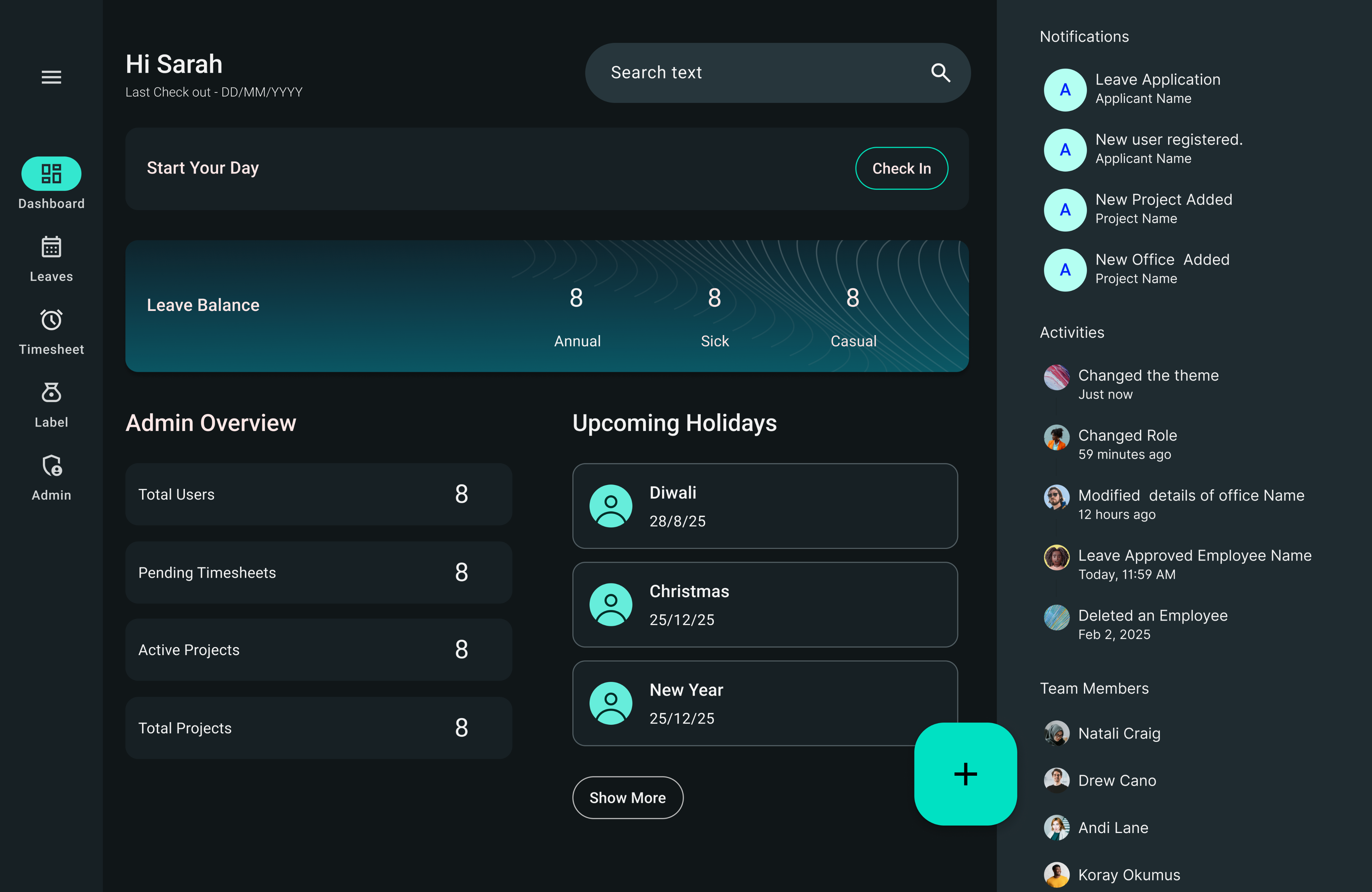
Role-Based Dashboard
The dashboard adapts to the user’s responsibilities, helps in reducing noise and prioritizing relevant actions.
Onboarding Oversight, Simplified
“Provides real-time visibility into onboarding bottlenecks.”
The Checkout Experience
Structured Reflection at the End of Every Workday
We redesigned check-out from a simple clock-out action into a structured work reflection — ensuring accurate reporting without adding friction.
The Problem
- Disconnected from projects
- Dependent on manual timesheet entry
- Prone to incomplete or inaccurate logs
The Goal
- Design a checkout experience that:
- Captures duration automatically
- Connects work to projects and activities
- Feels lightweight to the user
- Improves project cost visibility
RBAC / Permissions Matrix
Designing for Governance at Scale
All roles are not equal — and access should never be accidental
-Alphabetical Bookmarks for better navigation
- Separation Between Domains
- Card-Based Listing Improves Scanability
- Minimal Visual Noise- For Better Readability
My Learnings
UX is Organizational Architecture
I learned that in enterprise systems, UX is not interface design — it is organizational modeling.
Clarity Scales. Complexity Breaks.
Enterprise systems accumulate complexity fast.
The key learning was:
You don’t reduce complexity by hiding it.
You reduce complexity by structuring it.
Designing for Scale Requires Thinking Beyond the Current Scope
I started asking:
- What happens at 10 users?
- What happens at 5,000 users?
- What happens during audit?
Designing scalable permission structures and onboarding visibility prepared the system for growth.
UX Design Means Designing for Consequence
from thinking: “How does this screen look?” to And started asking:“What does this action affect downstream?”
Designing TalentFlake required connecting:
User action → System state → Organizational impact.
Enterprise UX is not about reducing complexity — it is about organizing it intelligently.

Talentflake
Designing a calm, scalable HRMS
Project Snapshot
Talentflake A role-aware, mobile-first HR platform built to reduce cognitive load.
Role
Product Designer
Platform
Web + Mobile
Focus
HRMS / Workforce Management
The Problem
HR tools feel Overwhelming
Poor onboarding visibility
Reporting feels intimidating
Lack of trust
"As teams scale, HR systems become heavier — increasing errors, anxiety, and inefficiency."
Design Goals

Reduce complexity
Simplify interfaces to show only what matters for each context and role.

Design for role clarity
Tailored experiences that respect how different users think and work.
Enable trust through visibility
Make processes transparent with clear status indicators and audit trails.
Make daily workflows predictable
Create consistent patterns that reduce decision fatigue and build confidence.
Build a scalable foundation
Design systems that grow gracefully without adding complexity.
The Stakeholders
Employee
Primary Goal
Complete tasks efficiently and stay informed
Core Frustration
Unclear where to find information, fear of making mistakes
Manager
Primary Goal
Approve requests quickly and track team status
Core Frustration
Drowning in approval notifications, no overview of team
HR Admin
Primary Goal
Maintain compliance and support workforce needs
Core Frustration
Time-consuming manual processes, difficult reporting
Finance
Primary Goal
Accurate payroll and budget tracking
Core Frustration
Data inconsistencies, hard to audit transactions
System Admin
Primary Goal
Secure access control and system reliability
Core Frustration
Complex permission systems, difficult to troubleshoot
Contractor
Primary Goal
Track hours and get paid on time
Core Frustration
Confusing timesheet systems, lack of visibility into payouts
Pain Points Across the Organization
Employee
Says
- I don't want to mess this up
- Where do I find that?
Does
- Double-checks forms
- Asks colleagues for help
Thinks
- Hope I filled this correctly
- This seems complicated
Feels
- Anxious about errors
- Uncertain about processes
Manager
Says
- I need to see my team's status
- Too many approval emails
Does
- Checks multiple tabs
- Batch processes approvals
Thinks
- I hope nothing slips through
- Need better overview
Feels
- Overwhelmed by notifications
- Responsible for accuracy
HR Admin
Says
• We need to stay compliant
• Reporting takes forever
Does
• Manual data exports
• Cross-references spreadsheets
Thinks
• Hope the data is accurate
• This should be automated
Feels
• Stressed by compliance
• Frustrated by inefficiency
Contractor
Says
• When will I get paid?
• Is my timesheet submitted?
Does
• Manually tracks hours
• Follows up on payments
Thinks
- Hope my hours are tracked right
- This is confusing
Feels
• Uncertain about status
• Disconnected from process
"Different roles experience HR systems emotionally very differently — clarity and reassurance matter as much as functionality."
Designed with Empathy
Fear of mistakes
Inline validation & previews
Approval overload
Summary-first views (Dashboards)
Need for reassurance
Status indicators everywhere
Compliance anxiety
Visible audit logs
Lack of visibility
Real-time status tracking
Process uncertainty
Step-by-step guidance
Information Architecture
Dashboard
Check-in / Attendance
Timesheets
Leaves
Expenses
Team (Managers only)
Approvals
--Timesheets
--Leaves
--Expenses
Team Attendance
Team Overview
People (HR / Admin)
Employees
--Employee Profile
--Onboarding Status
Roles & Permissions
Contractors
Projects
Project List
Project Hours
Project Cost
Reports
Check-in Report
Timesheet Report
Leave Balance
Payroll Summary
Contractor Payout
Project Hours
Project Cost
Company Settings (Admin)
Organization Details
Policies
--Leave Policies
--Attendance Policies
Departments & Locations
Integrations
Audit Logs (Admin)
Report Exports
Approvals
Role Changes
Profile
Personal Details
Preferences
Security
Key Product Areas
A system to maintain consistency, accessibility, and scalability
Role-Based Dashboard
The dashboard adapts to the user’s responsibilities, helps in reducing noise and prioritizing relevant actions.
Onboarding Oversight, Simplified
“Provides real-time visibility into onboarding bottlenecks.”
The Checkout Experience
Structured Reflection at the End of Every Workday
We redesigned check-out from a simple clock-out action into a structured work reflection — ensuring accurate reporting without adding friction.
The Problem
- Disconnected from projects
- Dependent on manual timesheet entry
- Prone to incomplete or inaccurate logs
The Goal
Design a checkout experience that:
- Captures duration automatically
- Connects work to projects and activities
- Feels lightweight to the user
- Improves project cost visibility
RBAC / Permissions Matrix
Designing for Governance at Scale
All roles are not equal — and access should never be accidental
-Alphabetical Bookmarks for better navigation
- Separation Between Domains
- Card-Based Listing Improves Scanability
- Minimal Visual Noise- For Better Readability
My Learnings
UX is Organizational Architecture
I learned that in enterprise systems, UX is not interface design — it is organizational modeling.
Clarity Scales. Complexity Breaks.
Enterprise systems accumulate complexity fast.
The key learning was:
You don’t reduce complexity by hiding it.
You reduce complexity by structuring it.
Designing for Scale Requires Thinking Beyond the Current Scope
I started asking:
- What happens at 10 users?
- What happens at 5,000 users?
- What happens during audit?
Designing scalable permission structures and onboarding visibility prepared the system for growth.
UX Design Means Designing for Consequence
from thinking: “How does this screen look?” to And started asking:“What does this action affect downstream?”
Designing TalentFlake required connecting:
User action → System state → Organizational impact.
Enterprise UX is not about reducing complexity — it is about organizing it intelligently.
